
I’ll be honest — I didn’t plan to write this article. It started when I was struggling with my own research last year, spending hours just trying to organize my notes and sources. A friend mentioned Notion AI almost casually, and I decided to try it. That one tool saved me probably 4-5 hours that week alone.
Thank you for reading this post, don't forget to subscribe!That got me curious. I spent the next few weeks actually searching for and testing the best free AI tools for students 2026 — not just reading about them, but using them for real tasks. Writing drafts, summarizing papers, and managing my schedule. Some were genuinely impressive. Others were a complete waste of time.
This list is what I ended up with after all that testing. 15 tools that actually work — and won’t cost you a single rupee.
Why Students Need AI Tools in 2026
The academic world has changed dramatically. AI is no longer a futuristic concept — it is already inside your browser, your notes app, and your email. Students who embrace these tools are completing more work in less time, scoring higher, and spending less time stressed at 2 AM.
Here is why AI tools for students have gone from optional to essential.
Save Time on Assignments
The average college student spends over 15 hours per week on assignments outside of class. That is enormous. AI tools like ChatGPT and QuillBot can cut that time significantly — not by doing your work for you, but by helping you get unstuck faster, draft quicker, and edit smarter.
Whether it is getting a starting point for an essay, checking grammar, or paraphrasing a source, these tools eliminate the hours of staring at a blank page.
Improve Writing and Research
Good writing is one of the most valuable academic skills — and it is also one of the hardest to master. AI tools for homework, like Grammarly, catch errors most students miss. Tools like Elicit and Scholarcy help you understand research papers in minutes instead of hours.
The result is cleaner writing, stronger arguments, and better grades.
Boost Productivity and Focus
Between social media, group chats, and the general noise of student life, staying focused is genuinely difficult. AI productivity tools like Motion and Otter AI help you manage your schedule, automate task planning, and capture everything from lectures so nothing falls through the cracks.
For students who struggle with time management, these tools can be life-changing.
Best Free AI Tools for Students 2026 for Writing & Assignments
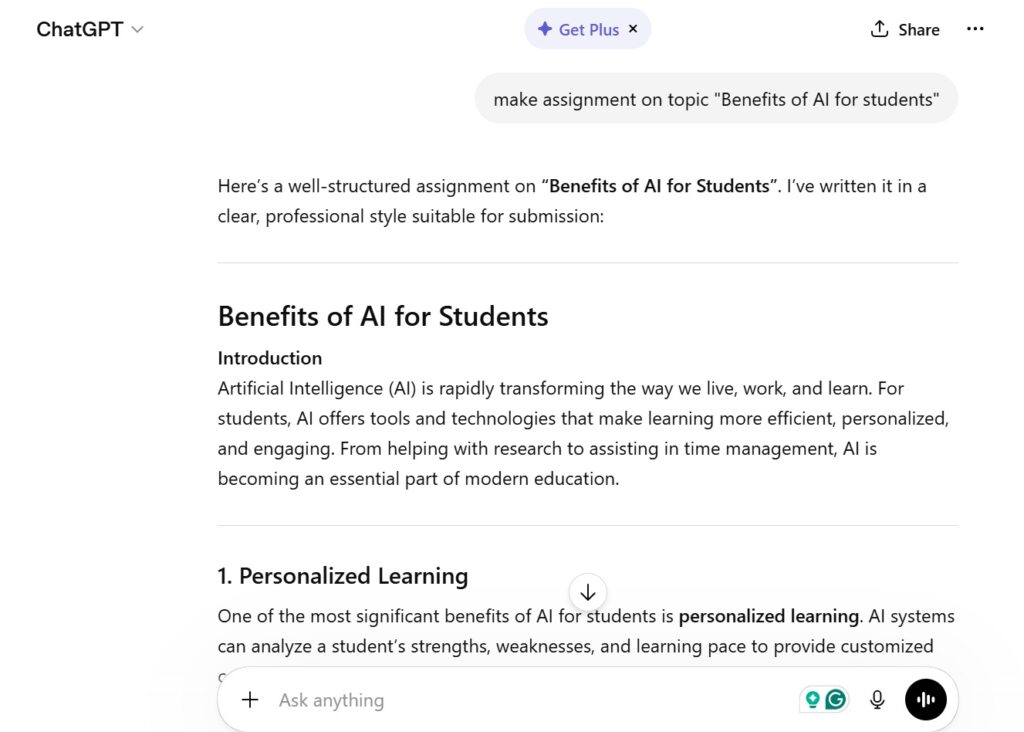
Writing is the core of academic life. Here are the three best free AI tools students can use right now to write better, faster.
ChatGPT – Best AI for Homework Help
ChatGPT needs no introduction. It is the most widely used AI assistant in the world, and for good reason. For students, it is like having a knowledgeable tutor available 24 hours a day.
You can use ChatGPT to:
- Brainstorm essay ideas and outlines
- Explain complex concepts in simple language
- Help debug code for CS assignments
- Draft and refine paragraphs
- Summarize long texts into key points
Free plan: Yes — GPT-4o access included in the free tier as of 2026.
Best for: Students who need a versatile AI assistant for almost any subject.
Pro tip: Always review and rewrite ChatGPT’s output in your own voice. Use it as a starting point, not a final answer.
Grammarly – Best for Writing Improvement
If you submit assignments with grammar errors, spelling mistakes, or awkward sentences, Grammarly will catch them all — and explain why they are wrong, so you actually learn.
The free version of Grammarly handles:
- Grammar and spelling corrections
- Clarity and conciseness suggestions
- Tone detection
- Plagiarism basic checks (premium for full)
It integrates directly into Google Docs, Microsoft Word, and your browser, so it works wherever you write.
Free plan: Yes — core writing suggestions are free.
Best for: Students who want to improve their academic writing quality quickly.
Pro tip: Pay attention to the explanations Grammarly gives, not just the fixes. Over time, you will stop making the same mistakes.
QuillBot – Best for Paraphrasing
Every student who has ever tried to cite a source in their own words knows the struggle. QuillBot solves this with a paraphrasing engine that genuinely rewrites content while keeping the meaning intact.
The free version gives you access to:
- Paraphraser (limited to 125 words per attempt)
- Summarizer tool
- Grammar checker
- Co-writer mode
It is one of the most useful free AI tools for homework, especially when you are working with heavy academic sources and need to restate ideas without copying them directly.
Free plan: Yes — with daily usage limits.
Best for: Students writing research papers and essays who need help properly paraphrasing sources.
Best Free AI Tools for Students 2026 for Study & Research
Research can eat hours of your day. These AI study tools 2026 make the process faster, smarter, and far less painful.
Notion AI – Smart Notes & Organization
Notion is already one of the best note-taking and organization apps for students. With Notion AI built in, it becomes something far more powerful.
Notion AI can:
- Summarize your lecture notes automatically
- Generate study guides from your content
- Help you brainstorm project ideas
- Write action items and to-do lists from messy notes
The combination of an organized workspace and an AI assistant in the same app is incredibly powerful for students managing multiple subjects and deadlines at once.
Free plan: Yes — Notion has a generous free plan with basic AI features.
Best for: Students who want a central hub for notes, tasks, projects, and AI assistance in one place.
Elicit AI – Research Paper Assistant
Elicit is one of the most underrated free AI tools for students — especially those doing serious academic research.
You type in a research question, and Elicit searches through millions of academic papers to surface the most relevant studies. It then extracts key findings, study sizes, and conclusions — so you can scan five papers in the time it used to take you to read one.
Free plan: Yes — limited queries per month on the free tier.
Best for: University students writing thesis papers, literature reviews, or any assignment that requires real academic sources.
Why it stands out: Unlike ChatGPT, Elicit pulls from actual peer-reviewed research, so you get citations you can actually use.
Scholarcy – Research Summarizer
Scholarcy does one thing very well: it takes a long, dense research paper and turns it into a digestible summary card.
Upload a PDF or paste a link, and Scholarcy pulls out:
- Key findings
- Study methodology
- Important definitions
- References worth following up on
For students who have to review dozens of papers for a literature review, Scholarcy can save hours of reading time without sacrificing depth of understanding.
Free plan: Yes — with a browser extension and basic summarization features.
Best for: Students doing heavy research who need to quickly assess whether a paper is relevant before committing to a full read.

Best Free AI Tools for Students 2026 for Productivity
Knowing your material is only half the battle. The other half is managing your time, staying organized, and showing up prepared. These AI apps for students handle the productivity side of academic life.
Motion AI – Task Management
Motion uses artificial intelligence to automatically schedule your tasks based on your deadlines, priorities, and available time. It does not just give you a to-do list — it builds your daily schedule for you.
For students juggling assignments, exams, part-time jobs, and social life, Motion removes the mental burden of figuring out what to work on and when.
Free plan: Limited trial available — paid plans start affordably.
Best for: Students who struggle with time management and procrastination.
Note: While Motion is not fully free, its AI-driven scheduling is worth mentioning because of how dramatically it can improve student productivity.
Otter AI – Lecture Notes
Otter AI is one of the most practically useful AI tools a student can have. It joins your Zoom lectures, in-person classes (via phone mic), or study sessions and creates a real-time, searchable transcript.
You can:
- Record and transcribe lectures automatically
- Highlight key moments during class
- Search your notes by keyword later
- Share transcripts with study groups
For students who miss things when taking manual notes — or who learn better by reviewing written transcripts — Otter AI is a genuine game-changer.
Free plan: Yes — 300 minutes of transcription per month on the free tier.
Best for: Students in lecture-heavy programs who want accurate, searchable class notes without effort.
Tome AI – Presentation Creator
Most students dread making presentations. Tome AI removes the pain. You describe your topic, and Tome generates a fully structured, visually designed presentation — complete with slides, layouts, and content.
You can then edit, rearrange, and customize everything to match your style and assignment requirements.
Free plan: Yes — generous free tier with core slide generation features.
Best for: Students who need to create presentations quickly for class projects, seminars, or group work.
Comparison Table of Best Free AI Tools for Students 2026
| Tool | Best For | Free Plan | Ease of Use | Standout Feature |
|---|---|---|---|---|
| ChatGPT | Homework help, writing | Yes | ⭐⭐⭐⭐⭐ | Versatile AI assistant |
| Grammarly | Writing improvement | Yes | ⭐⭐⭐⭐⭐ | Real-time grammar fix |
| QuillBot | Paraphrasing sources | Yes | ⭐⭐⭐⭐ | Smart rewriting engine |
| Notion AI | Notes & organization | Yes | ⭐⭐⭐⭐ | All-in-one workspace |
| Elicit AI | Academic research | Yes | ⭐⭐⭐⭐ | Searches real papers |
| Scholarcy | Summarizing papers | Yes | ⭐⭐⭐⭐ | Instant summary cards |
| Motion AI | Task scheduling | Trial | ⭐⭐⭐ | Auto-builds your day |
| Otter AI | Lecture transcription | Yes | ⭐⭐⭐⭐⭐ | Real-time transcripts |
| Tome AI | Presentations | Yes | ⭐⭐⭐⭐ | AI slide generation |
How to Choose the Best AI Tools for Students
With so many options available, it can be hard to know where to start. Here is a simple framework to help you pick the right tools for your situation.
Based on Study Needs
Not every student needs every tool. Ask yourself: What is my biggest academic pain point?
- Struggling with writing? → Start with ChatGPT + Grammarly
- Drowning in research papers? → Try Elicit + Scholarcy
- Missing things in lectures? → Download Otter AI
- Procrastinating on tasks? → Set up Motion AI or Notion
Pick tools that solve your real problems first, and add more gradually.
Free vs Paid Features
All the tools on this list have functional free plans. However, some key features — like unlimited paraphrasing in QuillBot or advanced AI in Notion — require paid upgrades.
Start on the free plan and only upgrade if you find yourself hitting limits regularly. Most students will find the free tiers more than enough for daily academic use.
Ease of Use
The best tool is the one you will actually use. If an app feels confusing or takes too long to set up, you will abandon it within a week. Grammarly and Otter AI are the easiest to get started with — they work in the background with almost no setup. Start there if you want quick wins.
Benefits of Using AI Tools for Students
Using AI tools for productivity as a student is not about cutting corners. It is about working smarter. Here is what students who use these tools consistently report:
- More time for deep study — repetitive tasks get automated, freeing mental energy for actual learning
- Stronger writing — ongoing feedback from tools like Grammarly builds genuine skills over time
- Better research — tools like Elicit surface relevant studies that students would have missed otherwise
- Lower stress — knowing your tasks are organized, and your notes are captured, reduces academic anxiety
- Higher grades — the combination of better writing, organized study, and more efficient research naturally leads to improved academic performance
These are not small wins. For many students, AI tools have been the single biggest upgrade to their academic life.
Limitations of AI Tools in Education
It is important to be honest here. AI tools are powerful, but they are not perfect — and misusing them can actually hurt your academic performance and integrity.
Here are the real limitations to keep in mind:
- AI can be wrong. ChatGPT in particular can confidently produce incorrect information. Always verify facts from academic sources.
- Over-reliance is a risk. If you let AI write everything for you, you will not develop the skills examiners are testing. Use AI as a scaffold, not a substitute.
- Plagiarism concerns. Many universities now use AI detection tools. Submit AI-assisted work ethically and always rewrite in your own voice.
- Free plan limits. Most free tiers have usage caps that can interrupt your workflow at the worst times.
- Privacy of data. Avoid pasting sensitive personal data or confidential research into AI tools without checking their privacy policies.
Used responsibly, these tools are excellent. The keyword is responsibly.
Tips to Use AI Tools Effectively for Studies
Getting the most out of AI tools for homework is a skill in itself. Here are the habits that separate students who see real results from those who feel underwhelmed:
- Be specific with your prompts. The more context you give ChatGPT or any AI tool, the better the output. Instead of “write an essay about climate change,” try “write a 500-word academic introduction on the economic impact of climate change in developing countries.”
- Always edit AI output. Treat AI responses as a rough first draft. Add your own analysis, rewrite in your voice, and make sure it matches the assignment requirements.
- Use one tool at a time. Do not try to implement nine new apps in a week. Pick one or two, get comfortable, then add more.
- Review AI explanations, not just corrections. When Grammarly flags something, read why. When ChatGPT explains a concept, ask follow-up questions. This is how you actually learn.
- Keep your own notes. Even with Otter AI transcribing your lectures, write a short personal summary of what you understood. Engagement beats passive consumption.
- Check your university’s AI policy. Some institutions have specific rules about which AI tools are permitted and how. Know the rules before you use the tools.
FAQs – Best Free AI Tools for Students 2026
Q1: What is the best free AI tool for students in 2026?
ChatGPT is the most versatile and widely used AI tool for students overall. For writing specifically, combining ChatGPT with Grammarly gives you the strongest results. For research, Elicit AI is the top choice.
Q2: Are AI tools safe for students to use?
Yes, when used responsibly. The tools listed here are reputable and widely trusted. Always review privacy policies and avoid entering sensitive personal information.
Q3: Can I use AI tools for homework without getting caught?
This is the wrong question to ask. Use AI ethically — to help you understand, draft, and improve your work — not to replace your own thinking. Most universities now have AI detection tools, and academic integrity matters for your long-term development.
Q4: Which AI tool is best for taking lecture notes?
Otter AI is the best choice for lecture notes. It records and transcribes in real time and creates searchable text from everything said in class.
Q5: Is Grammarly free for students?
Yes, Grammarly has a free version that includes core grammar, spelling, and clarity suggestions. A premium plan is available with more advanced features, but the free version is excellent for most students’ needs.
Q6: Can AI tools really improve my grades?
AI tools do not guarantee better grades — but they can significantly improve the quality of your writing, the depth of your research, and how efficiently you manage your time. Used consistently and correctly, that combination absolutely leads to better academic results.
Q7: What is the best AI tool for research papers?
Elicit AI is the top choice for research papers. It searches real peer-reviewed academic literature and extracts key findings, making literature reviews far more manageable. Scholarcy is a great companion for summarizing individual papers.
Conclusion – Which AI Tool is Best for You?
The best free AI tools for students 2026 are not a one-size-fits-all answer. The right tool depends on what you struggle with most.
If writing is your weak point, start with ChatGPT and Grammarly. If you are overwhelmed by research, add Elicit AI and Scholarcy to your toolkit. If you keep missing details in lectures, Otter AI will change your academic life. And if time management is your biggest enemy, Notion AI or Motion will help you take back control of your schedule.
The smartest move? Start with two or three tools, build the habit, and expand from there. Students who use these tools consistently — and use them ethically — are not just keeping up with their peers. They are pulling ahead.
AI is not replacing hardworking students. It is giving hardworking students an unfair advantage. Make sure you are on the right side of that equation.
Want more helpful tech and finance guides? Explore more articles on Cognetify — your go-to source for smart digital insights in 2026.

- Best Futures Position Size Calculator: Calculate Trading Risk - October 23, 2026
- How to Use Canva: 7 Easy Steps for Beginners - October 19, 2026
- How Much Is DEF Per Gallon in 2026? Best Prices & Savings - October 16, 2026